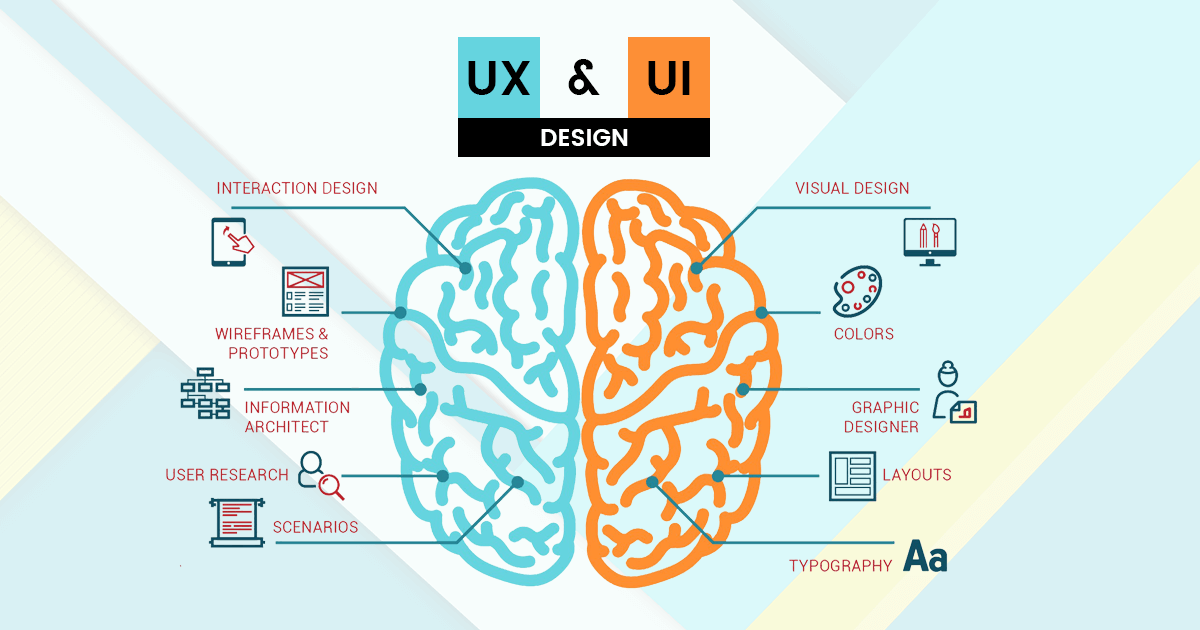
User Experience Design: Creating Applications People Love to Use
Beautiful code means nothing if users struggle with confusing interfaces. User experience design determines whether applications succeed or fail in competitive markets. Intuitive navigation, clear visual hierarchy, responsive interactions, and thoughtful features distinguish products people recommend from those they abandon. UX design isn’t decoration—it’s fundamental to creating valuable software.
Understanding User Needs
Great UX begins with understanding who uses applications and what they’re trying to accomplish. User research—interviews, surveys, usage analytics—reveals actual behavior rather than assumptions. People rarely use software the way designers imagine, making research essential for building interfaces that match real needs.
Personas represent typical users with specific goals, frustrations, and technical comfort levels. Designing for personas ensures decisions consider actual users rather than abstract requirements. User journey mapping visualizes complete experiences from initial awareness through ongoing usage, identifying friction points where users struggle or abandon processes.
Information Architecture
Before designing screens, organizing information logically creates foundations for intuitive experiences. How content is grouped, labeled, and structured determines whether users find what they need or get lost in confusion. Card sorting exercises reveal how users naturally categorize information, informing navigation structures.
Clear hierarchies guide attention to important elements while de-emphasizing secondary information. Too many options overwhelm users, while too few force them through unnecessary steps. Balancing simplicity with functionality requires understanding task priorities and user sophistication. Creating effective information architectures often benefits from collaboration with business analysts who bridge technical possibilities and user requirements to design workflows that make business sense while remaining intuitive.
Visual Design Principles
Visual design isn’t just aesthetics—it communicates meaning and guides behavior. Color draws attention, establishes hierarchy, and conveys status. Typography affects readability and tone. Spacing creates relationships between elements and provides visual breathing room that prevents interfaces from feeling cluttered.
Consistency across screens reduces cognitive load as users learn patterns once and apply them throughout applications. Design systems—reusable components with defined styles and behaviors—ensure consistency while accelerating development. Modern applications require responsive designs that adapt seamlessly across devices from phones to large monitors.
Interaction Design
How applications respond to user actions dramatically impacts perceived quality. Immediate feedback confirms actions occurred—buttons change appearance when clicked, forms validate input instantly, progress indicators show lengthy operations haven’t frozen. Without feedback, users wonder whether actions registered, often clicking repeatedly or abandoning processes.
Micro-interactions—subtle animations, transitions, and responses—add polish that makes applications feel alive rather than static. Loading states with skeleton screens feel faster than blank pages. Smooth transitions between states help users understand what changed. These details require careful implementation, making skilled mobile app development expertise valuable for creating experiences that feel fluid and responsive across all platforms.
Accessibility Matters
Accessible design benefits everyone, not just users with disabilities. High contrast improves readability in bright sunlight. Keyboard navigation helps power users work faster. Clear labels and logical structures assist people using screen readers while also improving SEO and general usability.
WCAG guidelines provide standards for creating accessible applications. Color contrast ratios ensure text remains readable. Alternative text describes images for screen readers. Semantic HTML enables assistive technologies to navigate content properly. Accessibility isn’t optional compliance checkbox—it’s fundamental to inclusive design.
Usability Testing
Assumptions about usability fail constantly. Watching real users attempt tasks reveals problems designers never imagined. Users misinterpret labels, overlook important features, and struggle with interfaces that seemed obvious during design.
Usability testing identifies these issues before launch when fixes are cheapest. Even informal testing with a few users uncovers major problems. Iterative testing throughout development prevents accumulating UX debt that requires expensive redesigns later.
Continuous Improvement
UX design never finishes. Analytics reveal which features users actually use, where they struggle, and where they abandon workflows. A/B testing compares design variations to validate improvements with data rather than opinions. Organizations committed to exceptional user experiences often hire dedicated developers who understand that great UX requires ongoing iteration and refinement based on real usage patterns.
User experience differentiates commodities into beloved products. The applications that win are those users enjoy using.